Losing important files can happen unexpectedly. Whether caused by accidental deletion, hard drive failure, malware attacks, corrupted partitions, system crashes, or formatting mistakes, data loss can have serious consequences for both individuals and businesses. Fortunately, modern recovery applications have become more reliable and capable of restoring lost files from various storage devices. Choosing the Best Data Recovery Software for Windows can significantly improve your chances of recovering valuable documents, photos, videos, emails, and other important data.
Windows remains the world’s most widely used desktop operating system, making reliable recovery software essential for millions of users. Modern recovery solutions support hard drives, SSDs, USB flash drives, memory cards, external storage devices, and even damaged partitions. Many tools now use artificial intelligence, advanced scanning algorithms, and deep recovery techniques to recover files that were once considered permanently lost.
This guide explores the Best Data Recovery Software for Windows in 2026, compares their features, highlights their strengths, and explains how to choose the right solution for your recovery needs.
Why Data Recovery Software Is Important
Data loss can occur for many reasons. A mistakenly deleted folder, a failed SSD, virus infection, power outage, or unexpected Windows update can result in missing files within seconds.
Professional recovery software scans storage devices for recoverable data before overwritten sectors permanently erase the information. These tools often recover files even after formatting or partition damage, helping users avoid costly professional recovery services.
Having reliable recovery software installed before a disaster occurs provides peace of mind and improves recovery success rates.
Features to Look for in Data Recovery Software
Before selecting a recovery application, users should evaluate several important features.
An ideal recovery solution should provide:
- Deep file scanning
- Quick recovery mode
- SSD and HDD support
- USB and memory card recovery
- Partition recovery
- Preview before recovery
- File type filtering
- User-friendly interface
- High recovery success rate
- Windows 11 compatibility
These capabilities improve both recovery accuracy and overall user experience.
1. EaseUS Data Recovery Wizard
EaseUS Data Recovery Wizard remains one of the most popular recovery applications for Windows.
The software supports recovery from deleted files, formatted drives, RAW partitions, external hard drives, USB drives, SSDs, and memory cards.
Its intuitive interface makes recovery accessible even for beginners while advanced scanning improves recovery success on damaged storage devices.
2. Stellar Data Recovery
Stellar Data Recovery is widely recognized for its professional-grade recovery capabilities.
The software supports document recovery, photo restoration, email recovery, RAID recovery, and partition recovery.
Businesses frequently choose Stellar because it offers advanced scanning options and supports large storage environments.
3. Disk Drill
Disk Drill provides a clean interface combined with powerful scanning technology.
The software recovers deleted files from Windows computers, external drives, memory cards, and mobile storage devices.
Additional features include recovery vault protection, disk health monitoring, and backup capabilities.
4. Wondershare Recoverit
Recoverit offers comprehensive recovery options for home users and businesses.
It supports more than one thousand file formats and recovers information from formatted drives, crashed systems, NAS storage, and external devices.
Its guided recovery process makes file restoration straightforward for users with limited technical knowledge.
5. R-Studio
R-Studio targets advanced users and IT professionals.
The software supports RAID reconstruction, network recovery, disk imaging, partition recovery, and advanced forensic capabilities.
Organizations managing enterprise environments often prefer R-Studio because of its extensive professional features.
6. Recuva
Recuva continues to be a reliable recovery tool for basic recovery needs.
Developed with simplicity in mind, it helps recover accidentally deleted files from Windows computers, USB drives, and memory cards.
Although less advanced than enterprise solutions, Recuva remains an excellent choice for personal use.
Comparing Recovery Performance
Every recovery application performs differently depending on the data loss scenario.
EaseUS and Recoverit provide excellent recovery rates for accidentally deleted files and formatted drives.
Stellar performs exceptionally well when recovering office documents, multimedia files, and email databases.
R-Studio offers unmatched flexibility for enterprise storage environments and complex recovery cases.
Choosing the right solution depends on storage type, technical expertise, and recovery complexity.
Free vs Paid Data Recovery Software
Many recovery applications offer free versions with limited recovery capacity.
Free editions often allow users to scan storage devices and recover a limited amount of data before requiring an upgrade.
Paid versions unlock advanced features such as deep scanning, unlimited recovery, RAID support, technical assistance, and professional recovery capabilities.
Businesses handling critical information generally benefit from premium recovery solutions.
Tips to Improve Recovery Success
Recovering deleted files successfully often depends on user actions immediately after data loss.
To maximize recovery chances:
- Stop using the affected drive immediately.
- Avoid installing software on the damaged disk.
- Perform recovery using another storage device.
- Create backups whenever possible.
- Scan the drive before attempting repairs.
- Save recovered files to a different storage location.
These precautions help prevent permanent data overwriting.
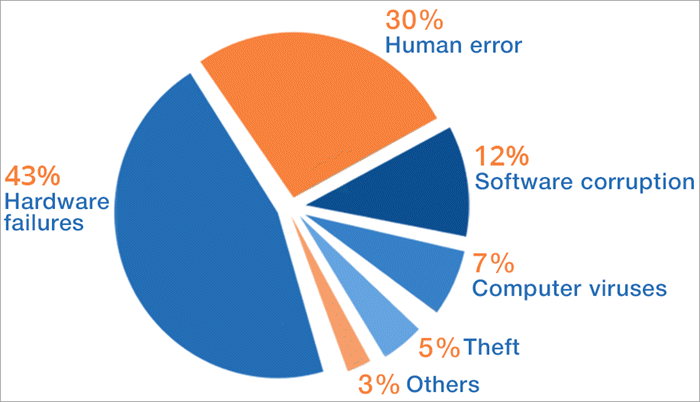
Common Causes of Data Loss
Understanding how data loss occurs helps users reduce future risks.
The most common causes include:
- Accidental file deletion
- Hard drive failure
- SSD corruption
- Virus and ransomware attacks
- System crashes
- Power failures
- Software corruption
- Partition formatting
- Human error
Regular backups remain the most effective defense against unexpected data loss.
Best Practices for Protecting Important Data
Although recovery software is valuable, prevention remains the better strategy.
Users should schedule automatic backups, enable Windows restore features, use cloud storage, install reliable antivirus software, monitor storage health, and regularly update Windows.
Businesses should implement disaster recovery plans, redundant storage systems, and backup verification procedures to minimize operational disruptions.
Combining prevention with recovery software provides comprehensive data protection.
The Future of Data Recovery Software
Data recovery technology continues evolving alongside advances in storage hardware.
Artificial intelligence now assists in identifying damaged file structures, improving recovery accuracy, and reducing scan times. Cloud-based recovery services, automated diagnostics, and predictive storage monitoring are becoming increasingly common.
As SSD technology, NVMe storage, and enterprise cloud infrastructure continue advancing, recovery software will become even more intelligent and efficient.
To learn more about protecting and recovering your files in Windows, visit the Microsoft Windows Support.